

IntelliJ Bean XML ClassPath Configuration Error - Spring
ConfigPath Error - FileNotFoundException because bean.xml file does not exist

Product-first engineer, blogger and open-source contributor with around 4 years of experience in software development, cloud-native architecture and distributed systems.
I build fintech products that process millions of transactions daily and drive substantial revenue. My expertise spans designing, architecting and deploying scalable software, focusing on the business under the code.
I collaborate closely with engineers, product owners, and guilds, known for my clear communication and team-centric approach in dynamic environments. Colleagues appreciate my adaptability, openness and focus on diverse, meaningful contributions. Beyond coding, I’m recognized for my documentation, ownership and presentation skills, which drive clarity and engagement across teams. Bilingual in English and Deustch, I bridge cross-functional teams across geographies, ensuring smooth, efficient communication.
I’m always open to new opportunities for connection and collaboration. Let’s connect and explore ways to create together.
When compared to Eclipse and NetBeans, the IntelliJ IDE is considered one of the most sophisticated and user-friendly IDEs. Regardless of the fact that Eclipse is the most widely used IDE for Java development, its user experience is poor and antiquated, and it lacks many of the functionalities that IntelliJ offers.
You might presume that all IDEs are the similar, with the exception of feature sets and user interfaces. Not at all. To have a project run well in certain IDEs, you must do certain configurations in each.
In most tutorials and trainings, the instructor will teach you how to build a project using Spring Framework with Eclipse IDE, but what if you wish to use IntelliJ IDEA to build Spring Projects?
If you execute the Main Program in IntelliJ Maven - Spring Project after creating all the required program files, just like in Eclipse, you will get a error like this snippet.
Exception in thread "main" org.springframework.beans.factory.BeanDefinitionStoreException: IOException parsing XML document from class path resource [springproject/personinfo/person.xml]; nested exception is java.io.FileNotFoundException: class path resource [springproject/personinfo/person.xml] cannot be opened because it does not exist
    at org.springframework.beans.factory.xml.XmlBeanDefinitionReader.loadBeanDefinitions(XmlBeanDefinitionReader.java:344)
    at org.springframework.beans.factory.xml.XmlBeanDefinitionReader.loadBeanDefinitions(XmlBeanDefinitionReader.java:304)
    at org.springframework.beans.factory.support.AbstractBeanDefinitionReader.loadBeanDefinitions(AbstractBeanDefinitionReader.java:181)
    at org.springframework.beans.factory.support.AbstractBeanDefinitionReader.loadBeanDefinitions(AbstractBeanDefinitionReader.java:217)
    at org.springframework.beans.factory.support.AbstractBeanDefinitionReader.loadBeanDefinitions(AbstractBeanDefinitionReader.java:188)
    at org.springframework.beans.factory.support.AbstractBeanDefinitionReader.loadBeanDefinitions(AbstractBeanDefinitionReader.java:252)
    at org.springframework.context.support.AbstractXmlApplicationContext.loadBeanDefinitions(AbstractXmlApplicationContext.java:127)
    at org.springframework.context.support.AbstractXmlApplicationContext.loadBeanDefinitions(AbstractXmlApplicationContext.java:93)
    at org.springframework.context.support.AbstractRefreshableApplicationContext.refreshBeanFactory(AbstractRefreshableApplicationContext.java:129)
    at org.springframework.context.support.AbstractApplicationContext.obtainFreshBeanFactory(AbstractApplicationContext.java:612)
    at org.springframework.context.support.AbstractApplicationContext.refresh(AbstractApplicationContext.java:513)
    at org.springframework.context.support.ClassPathXmlApplicationContext.<init>(ClassPathXmlApplicationContext.java:139)
    at org.springframework.context.support.ClassPathXmlApplicationContext.<init>(ClassPathXmlApplicationContext.java:83)
    at springproject.personinfo.Main.main(Main.java:8)
To resolve this error, you must need to configure the ClassPath for your project in a specific way IntelliJ understands.
1.Navigate to the pom.xml file.
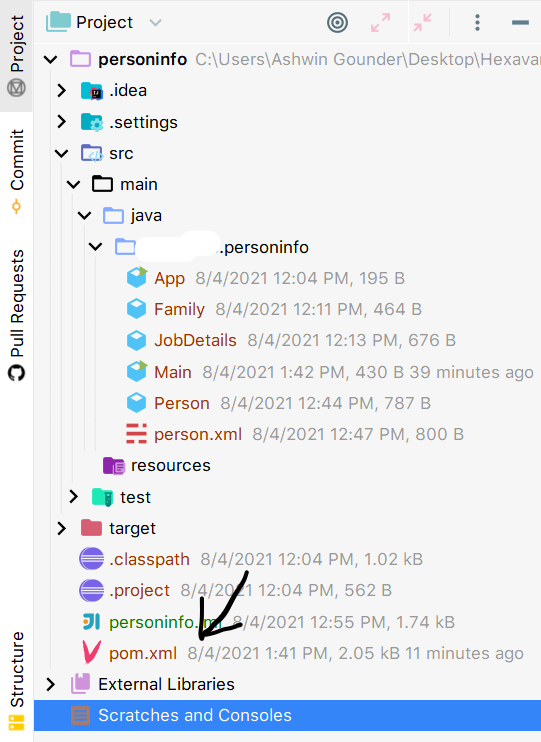
2.Insert this code snippet inside the build tag of the pom.xml file.
<!-- IntelliJ IDE needs the following configuration to read the src directory -->
      <resources>
          <resource>
              <directory>${basedir}/src</directory>
              <includes>
                  <include>**/*.properties</include>
                  <include>**/*.xml</include>
              </includes>
          </resource>
      </resources>
3.Refract all your .xml files to a new folder called resources under main folder in src directory of your project.
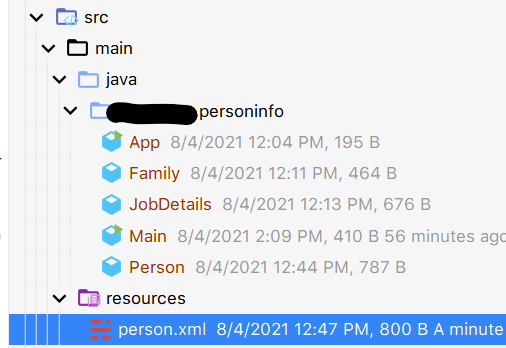
Tadaaaaaaaaaaaaaaa ! Your Spring Project will now run without errors in IntelliJ. ❤🤟🏻
Meet you in the next article.


